Flash safety
Rapid flashing light can trigger seizures in people with photosensitive epilepsy, and a projected wall fills far more of someone's view than a screen. So prism holds every projector to at most 3 full-frame flashes a second, unless you switch the limit off.
Advanced each projector (P1 ▸ Safety)
1Why it matters
For some people, light that flashes several times a second can trigger an epileptic seizure. Many don't know they're sensitive until it happens. The web's accessibility guidelines set a simple rule for this, WCAG 2.3.1 “Three Flashes”: nothing should flash more than three times in any one second.
Projection makes this matter more. A strobe on a phone is a small patch of light; a strobe across a wall, a stage or a room fills the whole view of everyone in it.
2What the limit does
- prism watches each projector's picture as it is drawn, frame by frame.
- A sudden jump in the overall brightness counts as a flash. Up to 3 may pass in any second, at least 0.3 s apart.
- A flash that would come too soon is held back: the picture is dimmed until it may pass. The rhythm of a fast strobe becomes a gentle flicker.
- Slow fades aren't flashes, and a picture getting darker is never held back. A steady strobe at 3 a second passes untouched.
3Where to switch it
Every projector at once
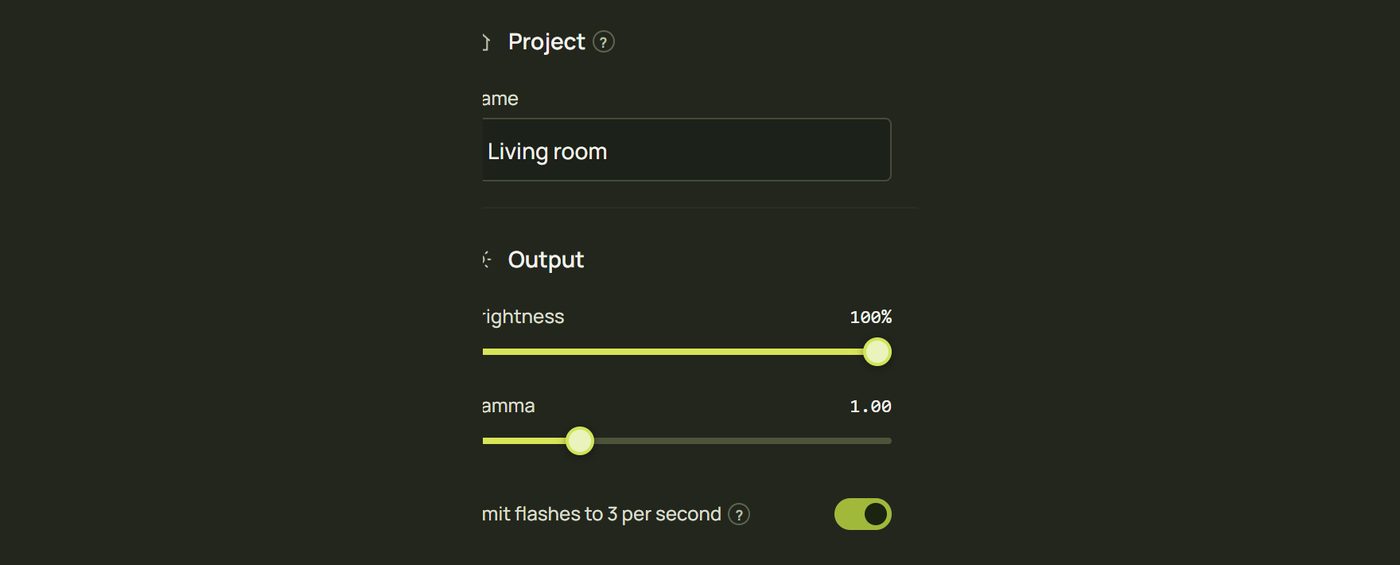
- In Design, click an empty part of the canvas (or press Esc) so nothing is selected.
- On the right, under Output, is Limit flashes to 3 per second. It applies to every projector.
Advanced One projector
Each projector keeps its own switch. In Advanced, click the projector's button in the canvas toolbar (P1): its settings end with Safety ▸ Limit flashes to 3 per second.

4Which looks are capped
| Look or action | With the limit on |
|---|---|
| Strobe | Flashes 3 times a second by default, and never faster while the limit is on. |
| Beat Strobe | Keeps to the beat but skips beats when they come too fast: twice a beat becomes once a beat above 90 BPM, and every other beat above 180 BPM. |
| Glitch, Lightning, looks that flash on drum hits | Held back by the projector's limit when they would flash too often. |
| Flash triggers (Tap, “Flash white”) | Held back the same way if you hit them faster than 3 a second. |
| Everything else | Checked all the time: any look, video or mix that would flash too fast is held back. |
5What isn't limited
- Blackout and the test patterns: you can always cut to black or check a projector.
- The laptop's Camera view in Design: it is your control screen, not a projector. The Projector view and every projector window are limited.
Check the running output
The Flash limit switch requests protection. The status beside it and in the top-bar status panel reports what each output window is actually doing.
| Status | Meaning |
|---|---|
| Active | The output's limiter is running during ordinary content playback. |
| Ready for show playback | The required graphics support is available, but normal content playback is not currently being limited; for example, the window is displaying a calibration pattern. |
| Switched off | The setting is disabled for this output. |
| Unavailable | The necessary graphics feature is unavailable, or the graphics context has been lost. The enabled switch does not make this output protected. |
| Open projector to check / not confirmed | No current output report. Open or reopen the output window, especially after updating an older running window. |
Scan and test patterns are not normal limited content. Recheck the status after restoring a window or GPU context. Limiting is a risk-reduction tool, not a guarantee that a show is safe for everyone; avoid aggressive flashing in your content. See Before a show.
Hints and tips
- Design with the limit on. Pulses, chases and colour changes on the beat look great without strobing.
- Brightness matters too. A full-white flash is the harshest kind; darker flashes and coloured ones are gentler.
- Test the whole show at full brightness before an audience sees it, and watch for anything that flickers.
- Tell the venue if the show has strong light effects, even with the limit on.
When something looks wrong
| You see | Why | Fix |
|---|---|---|
| A strobe flickers dimly instead of flashing | It flashes faster than 3 a second, so the limit holds it back. | Slow it down to 3 a second or less; that's working as intended. |
| Beat Strobe skips beats | At high tempos, flashing on every beat would pass the limit. | Expected; above 180 BPM it flashes every other beat. |
| The limit is off and you didn't switch it off | A project or projector from someone else had it off. | Switch it on again in the project settings (and, in Advanced, on each projector). |
| Flashes are still too intense | 3 bright flashes a second can still be a lot. | Lower the output brightness (nothing selected ▸ Output ▸ Brightness), or use softer looks. |